From the Season area of the navigation, select Payment settings.
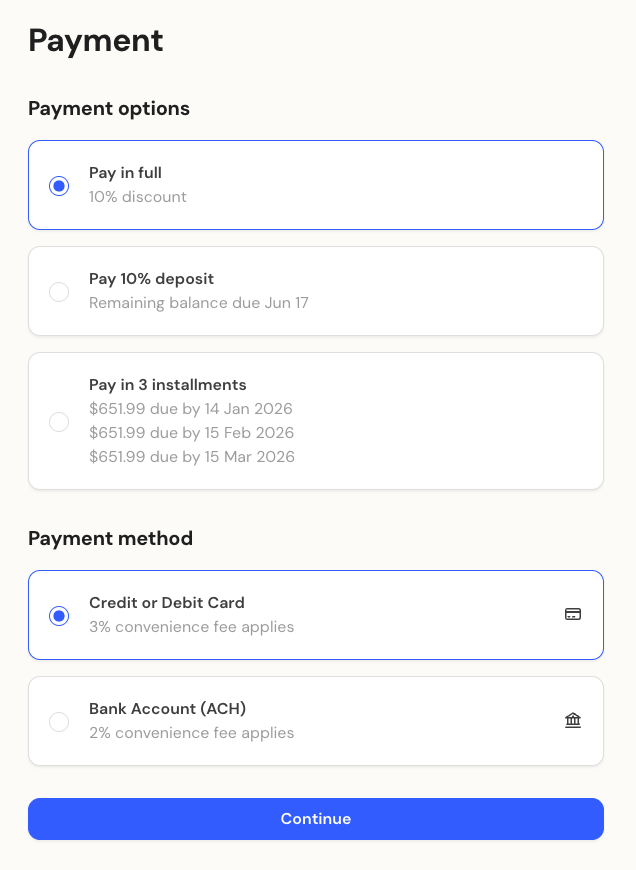
Here you can define payment rules and options for the selected camp season. These settings determine how payment choices appear to families during the enrollment checkout process.
You can decide whether to pass on transaction fees to families or absorb them yourself.
Enable convenience fees – Turn this on to add additional fees at checkout.
Card fee (%) – Set a percentage fee for card payments (for example, 3%).
ACH fee (%) – Set a percentage fee for ACH or bank transfer payments (for example, 2%).
Let families pay their full balance at the time of booking, or limit payments to partial options.
Enable payment in full – Allow or prevent full payment at checkout.
Payment in full discount (%) – Optionally offer a discount to families who pay their balance upfront (for example, 10%).
You can offer flexible payment options by allowing families to pay a deposit now and the remaining balance later.
Enable deposits – Turn on to allow deposits instead of full payment.
Deposit amount (%) – Set the percentage due at enrollment (for example, 10%).
Balance deadline – Define how many days before the session starts the remaining balance must be paid.
Installment plans make it easy for families to spread out payments over time.
Click + Add payment schedule.
Enter a Plan name (for example, 3-Payment Plan).
Set Valid from / until dates to control when the plan can be selected.
Enter a Deposit amount (% due at enrollment).
Add Installment dates and amounts as percentages of the remaining balance.
Use Split equally to divide payments automatically.
Ensure all percentages total 100%.
Click Save to finish creating the plan.
Each payment option you enable - such as paying in full, deposits, or installments - will appear as a selectable choice during the enrollment checkout.
Families can then choose the payment plan that best fits their needs, giving them flexibility and transparency at checkout.